Required Documents
This section provides documents related to the D.C. Opportunity Scholarship Program (OSP) for current and prospective families. You may need to download the free Adobe Reader program to view these files.
Supplemental Documents
- Renewal/Application Checklist
- Parents/guardians must submit proof of D.C. Residency and Income documents in addition to the submitted OSP Scholarship Application. OSP will provide application status notifications via the OSP Parent Portal and email. Screenshots, Paper or Electronic documents in PDF format submitted via Fax, Email or OSP Parent Portal will be accepted.
- Program Information Fact Sheet
- Income Affidavit
- If you are unable to provide income verification with acceptable documents from the checklist, please complete an Affidavit explaining your current source of income. This applies to applicants who are unemployed (not receiving unemployment benefits or unable to provide a pay stub or W2).
- Residency Affidavit
- If you are unable to provide residency verification with acceptable documents from the checklist, please complete an Affidavit explaining your current living situation. If someone is providing you with living accommodations, then they are also required to submit an Affidavit and provide proof of D.C. residency documentation.
- Did Not File Income Taxes Form
- If you did not file a Federal Tax Return but received a W2 or other sources of income such as Social Security, Disability, SNAP or other benefits, please complete a Did Not File Income Taxes Form. You will be required to submit official documentation of annual income amounts.
- SNAP Recipients and ESA Release Form
- SNAP Recipients have two options to submit proof of benefits:
- Option 1: Complete an ESA Release form (also available to complete electronically via the OSP Portal) AND upload a copy of your Driver’s License/ Non-Driver’s ID. This will allow the SOC staff to verify your SNAP Benefits directly with the Economic Security Administration (ESA) Office.
- Option 2: Upload your SNAP Benefits Letter or DC Health Link Online Portal snapshot with Benefit Start and End Dates AND upload a copy of your Driver’s License/ Non-Driver’s ID.
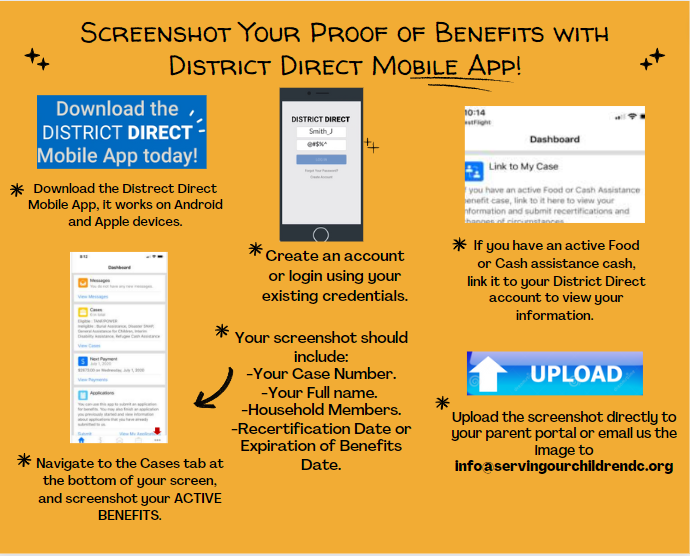
- Option 3: Use the District Direct Mobile App to retrieve a snapshot of your benefit verification AND upload a copy of your Driver’s License/ Non-Driver’s ID. Here are the Steps.